Tournament Practice Time Budget Calculator
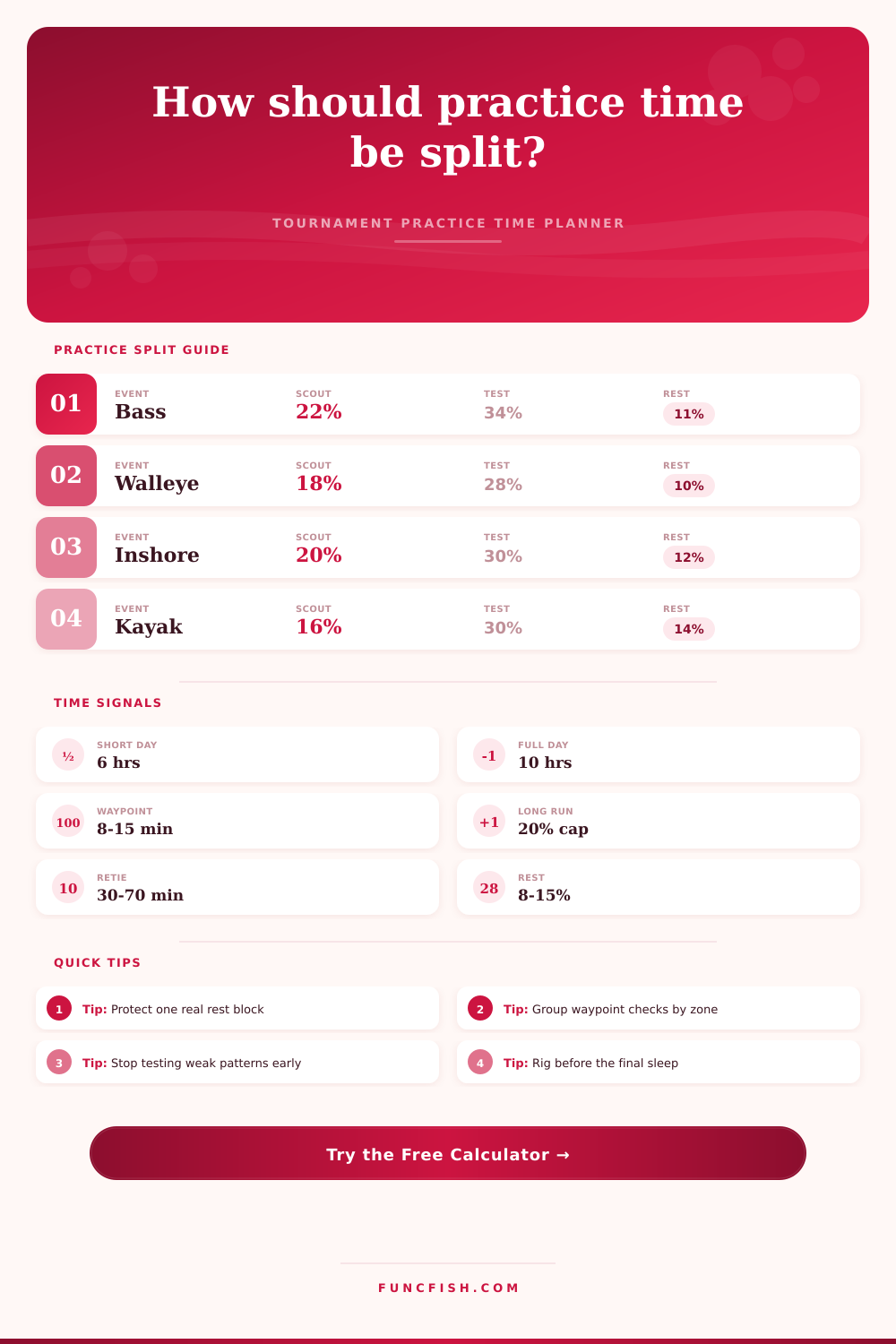
Allocate a fixed practice window across scouting, electronics, waypoint checks, pattern testing, travel runs, rest, and retie or rigging work.
🎯Practice presets
⚙Practice inputs
Practice time allocation
Full breakdown
📋Gear and species comparison grid
Shallow Bass
Offshore Bass
Walleye
Inshore
Kayak
River
Smallmouth
Multi-Species
📊Practice reference tables
| Practice category | Typical share | When to raise it | When to cap it |
|---|---|---|---|
| Scouting and map review | 14-28% | New water, sprawling lake, tidal spread | Home water or one small pool |
| Electronics scanning | 8-24% | Offshore, walleye, suspended bait | Grass punching or visual bank work |
| Waypoint checks | 8-22% | Many saved spots, seasonal history | Fishing history is stale or noisy |
| Pattern testing | 26-42% | Several viable techniques remain | Bites are obvious or time is short |
| Travel runs | 6-20% | Long water, locks, tides, wind lanes | Compact launch area |
| Rest and recovery | 8-16% | Heat, rough water, multi-day event | Single short evening practice |
| Retie and rigging | 5-12% | Many rod changes or partner prep | Minimal tackle plan |
| Waypoint load | Check pace | Best grouping | Practice decision |
|---|---|---|---|
| 0-8 saved spots | 6-9 min each | By nearest cover line | Leave more time for fresh scouting |
| 9-20 saved spots | 8-12 min each | By creek, bay, or shoal | Verify history before fishing hard |
| 21-40 saved spots | 10-14 min each | By run direction | Cull weak marks before launch |
| 41+ saved spots | 12-16 min each | By tournament day rotation | Sample only the highest value clusters |
| Electronics setup | Scan share | Waypoint share | Notes for practice |
|---|---|---|---|
| Basic mapping only | 6-9% | 10-16% | Use contour and visible cover first |
| Side scan plus map | 12-18% | 12-18% | Scan lanes before stopping to fish |
| Forward sonar heavy | 16-24% | 10-16% | Separate finding fish from catching fish |
| Trolling grid review | 18-26% | 8-14% | Protect clean passes over likely bands |
| Visual shallow work | 4-8% | 8-14% | Save scan time for staging areas |
| Low electronics event | 2-6% | 6-10% | Shift time toward timing and repeats |
| Event style | High-value block | Block length | Fatigue watch |
|---|---|---|---|
| Shallow bass cover | Pattern testing | 45-75 min | Wasted casts in dead stretches |
| Offshore structure | Scan then sample | 60-90 min | Over-scanning without bait clues |
| Smallmouth clear water | Timing windows | 50-80 min | Chasing visible fish too long |
| Walleye event | Depth and speed bands | 70-100 min | Long idle passes with no decision |
| Inshore tide event | Tide stage checks | 40-70 min | Missing the same stage next day |
| Kayak event | Access and energy | 35-60 min | Travel that steals fishing power |
💡Practice time checks
Tip: Treat scouting and pattern testing as different jobs. Scouting asks where fish could be; testing proves whether a repeatable bite exists.
Tip: Protect retie time before the final night. A strong plan loses value if rods, leaders, and waypoint notes are unfinished.
A lot of times, your day of practice ends up being a scavenger hunt. You get up stoked, go out, and look for a few hotspots that the sun hasn’t burned off yet. That seem productive until you finally realize you’ve tied on lures, drove around a bunch, and barely fished at all. Did you fish a pattern long enough to determine whether or not it’s going? Time management separate a good practice from a great one. Most of the time, it’s not about catching more fish. It’s about beating the clock almost as hard as water conditions.
Before launching, it makes you think, “How do I divide my limited time between rigging, resting, travel, testing, electronics, waypoint checking and scouting? The calculator make those tough decisions for you. Say you’re on a new lake with lots of electronics. What does it tell you? Scanning more reduces the time spent testing patterns. And you better know that going in.
Manage Your Practice Time Better
You want to know where fish might be (scout). Do they have a repeatable bite (test)? Without spending enough time testing, you go home with questions not answers.
The inputs are your reality check Choose a large lake with lots of waypoints already on the map. Now the math change. Checking waypoints makes you feel good. It gives you a sense of accomplishment as you stare at the graph and feel smart. But what if it’s a dud? Twenty minutes down the drain.
Use the reference tables. Checking in zones together will save you time going to different spots. It’s a little tweak with a big payoff. You’re checking things out before you fish it hard; you just aren’t letting it eat up your day.
Another big variable would be electronics workload. Forward sonar make all of the difference. They can helps you locate fish in a hurry. But they can make you scan for hours on end with no bites. In an event where that’s required by the format, the calculator limits your scan time. Locating fish versus actually catching them is two different things. You need to learn how to differentiate between the two.
If you’re fishing visual cover like shallow grass, scanning take a back seat. You will look at water surface much more than stare at screens. Most folks mess this up because they think more information is always best. Less time on screen can mean more time in the boat.
The silent killer on practice days are travel runs. On paper it looks like you’re only going X miles one way. In fact, things like launching, warming up, running, coming back, and shutting down can easily eat up two hours. The tool includes realistic distances and run times. It reminds you that driving the boat doesn’t count as fishing.
In river systems with locks or kayak tournaments where travel time is a huge percent of your budget, you need to understand you’ll be fishing less spots. And in this case depth trumps breadth. There’s no room for gluttony. That’s by design.
There’s a rest buffer built into the calculator. Protecting one real rest block prevent decision fatigue. A worn out fisherman chases every bite, making poor decisions. They aren’t sticking with the game plan. Don’t be setting up gear in the daylight. Do that during the last sleep period. Messy waypoints and tangled-up rods negates a good plan.
The calculator allows enough time for the boring tasks. We’re not trying to do it all. We want to do the right things at the right times. That means we don’t need to test every lure, scan every drop or scout every cove. We must prioritize our efforts.
After plugging in your conditions, the calculator does the math for you, eliminating the need for guesswork on conversions and coefficients. When the pressure mounts, it provides a framework to follow. Yes, you’ll still run into stubborn fish, stale history and wind. But you won’t waste your time doing it.
You’ll walk away from the water with a plan, not simply a list of places you’ve visited. And that’s the beauty of a budget. It converts chaos into a schedule that you can follow come sunrise on tournament day.